
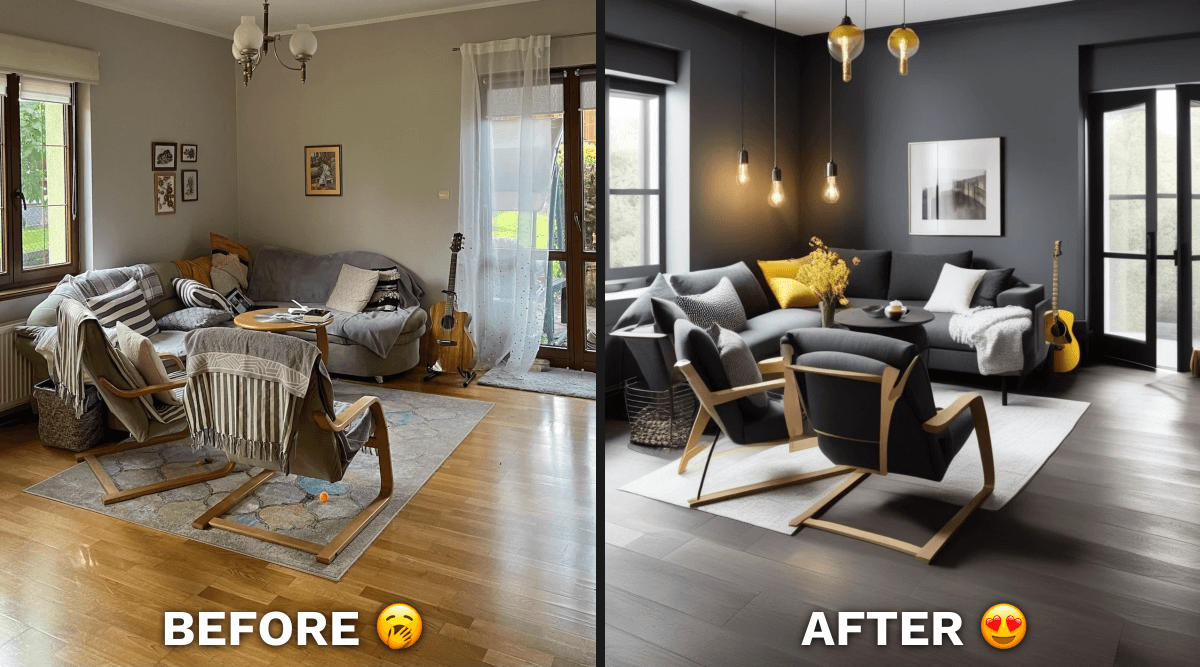
Design your own house can mean two very different things, and the right free tool depends on which one you mean. Are you drawing the floor plan and layout of a home, or are you working out what a room you already have could look like? This guide covers both, with what each free plan actually includes, checked on each tool's own site in September 2026. Plans and limits change often, so confirm on the linked pages before you rely on them.
Decoratly is one of the six tools below, and we make it, so we have tried to describe every tool by what its own site says rather than by opinion.
Which kind of tool do you need?
- You want to draw a floor plan, move walls and place furniture to scale. Use a floor planner or 3D room planner: Planner 5D, RoomSketcher, Sweet Home 3D, Floorplanner or Homestyler.
- You have a room and want to see it in a new style, colors or furniture. Use an AI redesign tool that starts from a photo, like Decoratly.
- You are building or extending a house. Free tools can help you explore ideas, but structural plans, permits and building regulations need an architect, engineer or qualified designer.
1. Planner 5D: the easiest floor planner to start with
Planner 5D lets you draw a floor plan and furnish it in 2D and 3D from a web browser or phone.
- Free plan: creating and sharing an unlimited number of projects, and access to about half of its furniture catalog, on web and mobile.
- Paid plans: Premium at $19.99 a month or $59.99 a year adds the full catalog of 10,000+ items, standard renders and the option to upload a floor plan and turn it into a 3D project. Professional is $49.99 a month or $399.99 a year and adds unlimited 4K renders and 360-degree walkthroughs.
- Good for: planning a layout and trying furniture in a home you are designing from scratch.
Source: Planner 5D pricing.
2. RoomSketcher: floor plans with 3D snapshots
RoomSketcher is built around clear floor plans and 3D views you can share.
- Free plan: your first floor plan free, with 10 projects kept in your archive, 2D and 3D floor plans, 3D snapshots, an AI render and one free AI floor plan conversion. Measurements, the total area calculator, labels and 360 views are not included.
- Paid plans: Pro is $12 a month billed annually ($144 a year), or $24 if you pay monthly, and adds the full furniture library, 3D photos and 360 views.
- Good for: a tidy floor plan you can show to a contractor or family.
Source: RoomSketcher pricing.
3. Sweet Home 3D: fully free and open source
Sweet Home 3D describes itself as a free interior design application that helps you draw the plan of your house, arrange furniture on it and visit the result in 3D.
- Cost: free, distributed as open source under the GNU General Public License. You can install it on a computer, phone or tablet, or use it in a browser.
- Includes: 2D floor planning, 3D views and a library of models and textures (the full version lists over 10,000 models and 400 textures), plus 3D photo and video renders.
- Good for: people who want a capable planner with no paywall and are happy with a more traditional interface.
Source: Sweet Home 3D.
4. Floorplanner: quick floor plans in the browser
Floorplanner runs in your browser and is aimed at drawing floor plans and exporting images.
- Free plan: up to 5 free projects, up to 3 floors per project, and image exports at SD quality (960 by 540 pixels) with a watermark.
- Upgrades: credits can be used to export in HD, 4K or 8K, to remove the watermark and to add more floors. Paid subscriptions exist for people who export a lot.
- Good for: a fast plan and a small image to share.
Source: Floorplanner pricing.
5. Homestyler: a free 3D planner with a large model library
Homestyler is a 3D interior design platform with a cloud floor planner and a large library of 3D furniture models.
- Free plan (Basic): the cloud 3D floor planner, unlimited 1K rendering and a library of 100,000+ free 3D models and materials. 4K renders are bought separately.
- Paid plans: Pro+ from $6.8 a month and Master+ from $11.8 a month (both shown with a 40 percent discount) add higher-resolution renders, watermark removal and AI credits.
- Good for: building a room in 3D with real furniture models. See our Homestyler vs Decoratly comparison.
Source: Homestyler pricing.
6. Decoratly: see your existing room in a new style
Decoratly does not draw floor plans. You upload a photo of a real room and it shows you the same room redesigned in a new style, in about 30 seconds, keeping your walls, windows and proportions.
- Free plan: 1 design from your own photo, with no signup and no card, in 6 starter styles. Free results are watermarked and at web resolution.
- Pro: a one-time $9.99 payment for 30 days (not a subscription) with unlimited rooms, 200 designs, all 75+ styles, edit tools and full-quality downloads.
- Good for: deciding on a style, color or furniture before you spend money on a room you already have.
Try it on your own room with the free room designer, or read our guide to designing a whole house room by room.
How to choose
- New build or extension: start with a floor planner (Planner 5D, RoomSketcher or Sweet Home 3D) to explore layouts, then take the plan to a professional.
- Renovating a room you own: use a floor planner if you are moving walls, and a photo-based tool like Decoratly to compare finishes and styles.
- Just curious what a style would look like: try an AI redesign tool first. It takes minutes and costs nothing.
- On a strict budget: Sweet Home 3D is completely free, and the others have usable free plans with limits.
Tips for designing your own house
- Start with how you live. Write down what is not working before you pick styles.
- Measure before you buy. Whatever tool you use, check every dimension against the real room. A room size calculator helps.
- Plan the order of work. Structural and technical work first, then kitchens and bathrooms, then surfaces, then furniture and decor.
- Keep the house consistent. A shared palette and repeated materials make separate rooms feel like one home.
- Know when to hire a professional. Anything involving structure, plumbing, electrics or permits needs one. Our guide to what an interior decorator costs explains how fees work.
Frequently Asked Questions
How can I design my own house online for free?
Use a free floor planner such as Planner 5D, RoomSketcher, Sweet Home 3D, Floorplanner or Homestyler to draw a layout, and a photo-based tool like Decoratly to preview styles on a room you already have. Each free plan has limits, so check what is included before you start.
Is there completely free software to design a house?
Sweet Home 3D is free and open source. The others offer free plans with limits, such as fewer catalog items, watermarked exports or lower resolution.
Can I design a house from a photo?
You can redesign the look of a room from a photo with a tool like Decoratly, which shows the same room in a new style. Drawing an accurate floor plan still needs measurements and a planner.
Do I need an architect to design my own house?
For a new build, an extension or any structural change you will need a qualified professional and usually permits. Free tools are useful for exploring ideas and communicating what you want.
What is the best free app to design a room?
It depends on the job. For layouts and measurements, a floor planner. For seeing a room in a new style quickly, a photo-based AI tool. See the best AI room design tools compared.
See your room professionally redesigned in 30 seconds.
Upload a photo → AI redesigns it in any style → download photorealistic renders as your shopping guide. No decorator needed.
No credit card · 1 room free