
Furniture finder: shop any room from one photo
Upload a photo of a room you like. The finder lists the pieces in it, from the sofa to the lamps, with the color, material and a typical price, and gives you a search for each one at Google Shopping, Amazon and Wayfair.
By Kamil Uhryn, founder of Decoratly · Updated November 2026 · How it works · Your photo is deleted within two days
What the finder saw in this living room.
This is its unedited answer for a living room designed in Decoratly. It took about two seconds.
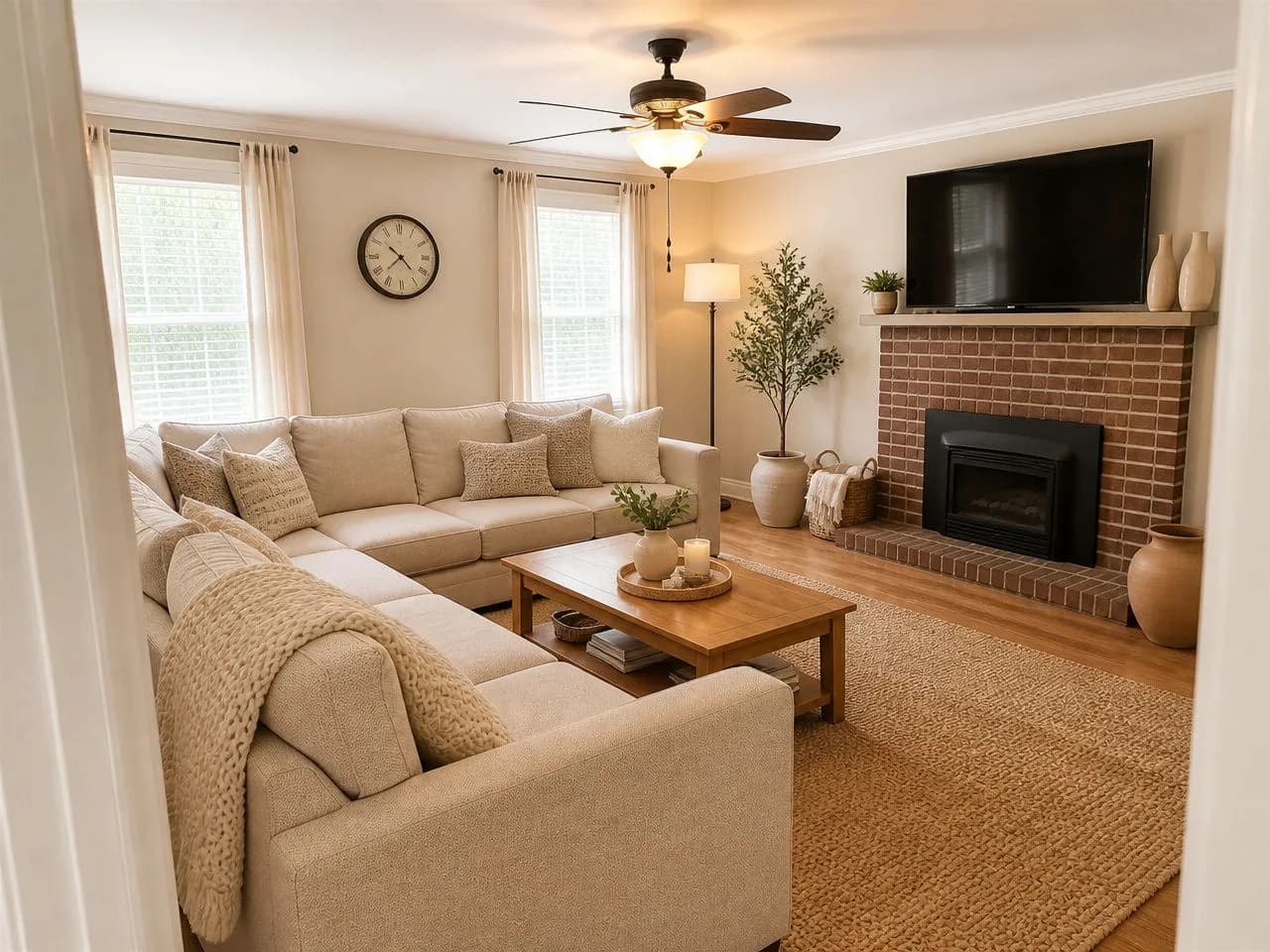 🛋️ 10 pieces found
- Beige L-shaped sectional sofabeige · fabric$1,200-$2,500
- Rectangular wood coffee table with lower shelflight brown · wood$200-$500
- Brown brick fireplace with black insertbrown · brick$800-$2,000
- Flat-screen TV on wood mantelblack · plastic and glass$300-$800
- Ceiling fan with light kitdark brown · wood and metal$100-$300
- Jute area rugtan · jute$150-$400
- Floor lamp with white shadeblack and white · metal and fabric$60-$150
- Faux olive tree in woven potgreen · faux foliage and woven basket$80-$200
- Round wall clockblack and white · metal and glass$30-$80
- Beige curtains with dark rodbeige · fabric$40-$120
Most of it is right: the L-shaped sectional, the coffee table with its lower shelf, the jute rug, the fan with its light kit. Two slips are worth knowing about. It listed the brick fireplace, which is part of the house, and it called a ceramic planter woven. That is why each piece comes with a search to check, not a product to buy blind.
One photo in, a shopping list out.
- 1
Add a photo
Any room photo works: one you took, a screenshot from Pinterest or Instagram, a hotel listing. A wide shot shows more pieces.
- 2
Read the list
Each piece comes back with its color, material, where it sits in the photo and what something similar usually costs new.
- 3
Search one tap away
Every piece has a ready-made search for Google Shopping, Amazon and Wayfair. Copy it if you shop somewhere else.
Photos that find more pieces
Shoot the whole room from a corner
Standing in a corner fits two walls and most of the furniture into one frame. Straight-on shots of one wall miss whatever is behind you.
Use daylight
Colors read truer in daylight. Under warm bulbs a grey sofa can come back as beige, and the search follows the color.
Crop in for one piece
If you only care about the lamp, crop the photo around it. The finder then describes that one piece in more detail.
Screenshots are fine
A Pinterest pin or an Instagram post works as long as the room fills most of the screenshot. Crop away captions and buttons first.
From a name to a piece that fits.
A description like “beige L-shaped sectional” gets you close. These steps get you to one you would actually buy.
- 1
Start with the search we give you
It already has the shape, material and color. That alone usually brings up pieces in the right family.
- 2
Add the one number that matters
For a sofa, the length (most three-seat sofas run about 72 to 90 inches). For a rug, the size: 5x8, 8x10 or 9x12. For a table, the height. A size in the search cuts out most of the wrong results.
- 3
Filter by material before price
A jute rug and a polyester rug that looks like jute feel nothing alike underfoot. Pick the material you want first, then compare prices.
- 4
Check it fits your room
A sectional from a 20-foot room will not fit a 12-foot wall. Measure, then check the piece against your floor plan. Room size calculator
- 5
For the exact piece, crop and use Google Lens
The finder describes; it does not know brands it cannot see. If you need the exact model, crop the photo to that one piece and run it through Google Lens, which matches it against product listings.
This finder, Google Lens or a Reddit post?
They answer different questions, and the best results often come from using two of them.
| This furniture finder | Google Lens | Asking on Reddit | |
|---|---|---|---|
| What it gives you | Every piece in the room, with color, material, price range and a search | Product listings that look like the one object you select | People who may know the exact piece |
| Whole room at once | Yes | No, one object at a time | If someone takes the time |
| Exact brand and model | Only if a logo is visible | Often, for popular products | Sometimes, for designer pieces |
| Speed | A few seconds | A few seconds | Hours to days |
| Best for | Copying a look you like | Finding one specific product | Rare or vintage pieces |
What it can't do
- It describes what it can see. It does not know brand names unless a logo is visible in the photo.
- Prices are typical US prices for a similar new piece, not the price of the one in your photo.
- It can slip. In the living room example it listed the brick fireplace, which you can't buy, and called a ceramic planter woven.
- Small things on shelves and tables are often skipped. Crop the photo around them to get them listed.
Try the pieces in your own room
A sofa that looks right in someone else's photo can swallow a smaller room or clash with your floor. Decoratly redesigns a photo of your room in a style you choose, keeping the walls, windows and layout, so you can see the new sofa, rug or wall color in your space before you order.
Start with the free AI room designer, or place one piece into your photo with the furniture visualizer.
Questions before you upload.
Is the furniture finder free?
Yes. There is no account, no login and no card. To keep it free for everyone there is a daily limit per connection, which a normal visit will not reach.
Can it find the exact brand and model?
Only when a logo or name is visible in the photo. Otherwise it describes the piece as precisely as it can, shape, material and color, which is what you need to find the same piece or a close match. For an exact product, crop the photo to that piece and try Google Lens.
How accurate are the prices?
They are estimates of what a similar new piece usually costs at US retailers. The piece in your photo could be vintage, custom or a lot more expensive. Use the range to judge whether a listing is in the right ballpark.
Does it work with Pinterest and Instagram pictures?
Yes. Take a screenshot, crop away the app's buttons and captions, and upload it. The more of the screenshot the room fills, the more pieces it finds.
What happens to my photo?
It is used for this one search and kept for up to two days so that the Redesign this room button can open it in the Decoratly app. After that it is deleted automatically. It is never published or shown to anyone else.
Why do some links say Amazon or Wayfair?
Each piece gets a ready-made search at three big US stores so you can compare quickly. The links open a search, not one product, and you are free to shop anywhere.
Can I see the furniture in my own room before I buy it?
Yes, in Decoratly. After your results, Redesign this room opens your photo in the app, where you can redesign it in a style or add and swap furniture. The first design is free with no login.
How the finder works
Your photo is resized in your browser and sent to Decoratly's server, where an open vision model (currently DeepSeek V4.1 Flash, run through Together AI) looks at it once and returns the pieces it can see. It is told to describe only what is visible and never to guess brands. The same step powers Shop the look inside the Decoratly app. The photo is kept for up to two days, so that Redesign this room can open it in the app, and is then deleted automatically.
Built by Kamil Uhryn, who makes Decoratly, an AI interior design app that redesigns a photo of your room. Updated November 2026.